

← All apps/ 01 — SEVER SHOW CONTROLmacOS · APPLE SILICON · v0.6.24
SEVER SHOW CONTROLSEVER
SHOW CONTROL

One timeline for the entire show crew.

SEVER SHOW CONTROL

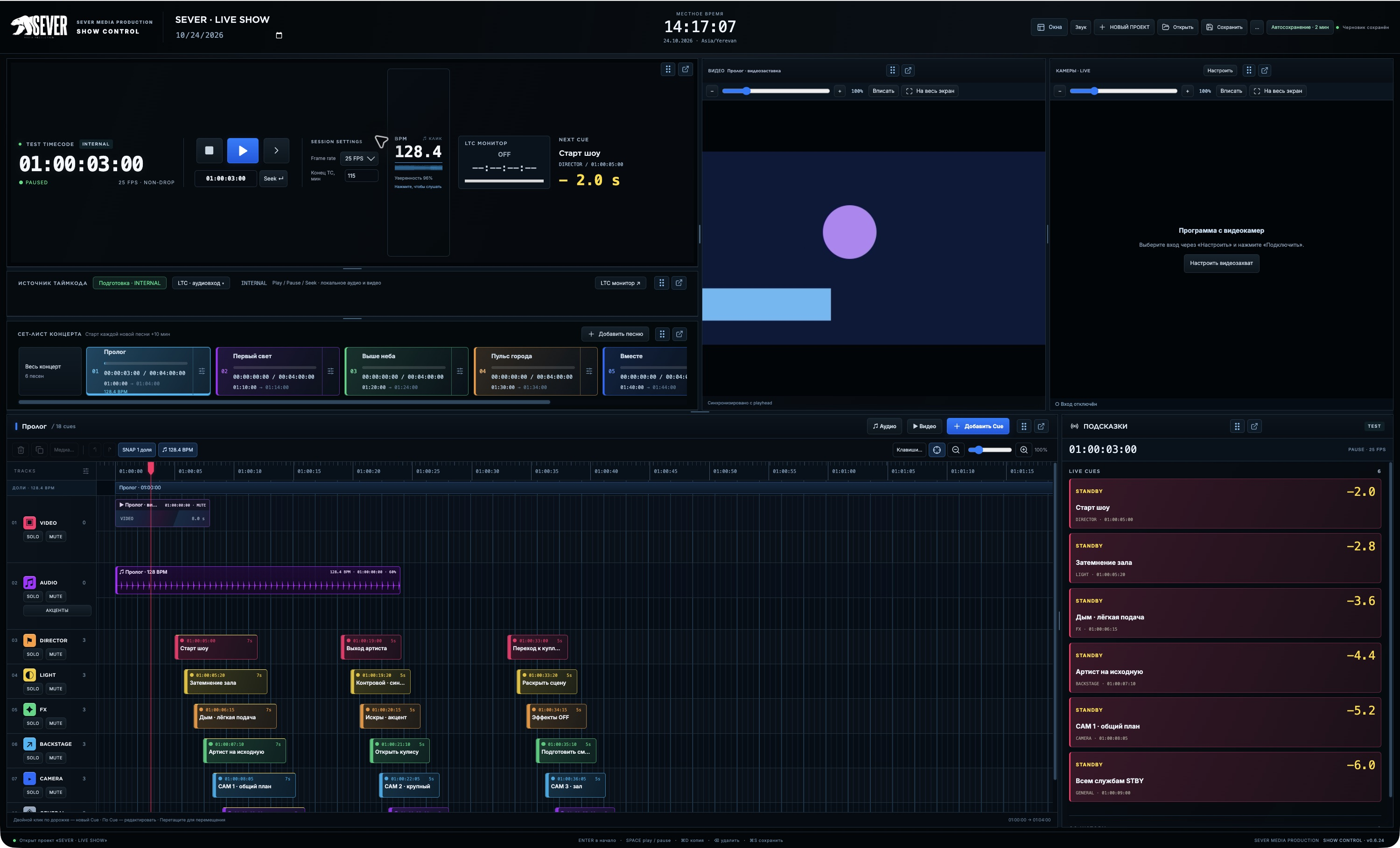
Prepare and run concerts, broadcasts and stage events. Bring audio, video and director cues together, sync them to external LTC timecode and open dedicated windows for every department. Lighting, sound, video, cameras and backstage get their cues at the right moment.

Version 0.6.24 · macOS · Apple Silicon · 132.9 MB

SEVER SHOW CONTROL timeline, media panels and department cue monitors
SEVER SHOW CONTROL workspace · click to view full size

Every department. One timecode. One rhythm.

SEVER MEDIA PRODUCTION presents SEVER SHOW CONTROL, a macOS app for planning and running events. It brings the setlist, media and technical department cues onto a shared timeline.

01
TIMELINE / CUES
Timeline: audio, waveforms and cue tracks
Timeline: audio, waveforms and cue tracksOpen full screenshot ↗

From preparation to rehearsal

Build your running order, set start times and place cues on VIDEO, AUDIO, DIRECTOR, LIGHT, FX, BACKSTAGE, CAMERA and GENERAL tracks. Add names, colours, durations and advance warnings. Import audio and video, view waveforms and fine-tune events with frame-level precision.

An internal transport with playback, pause and seeking supports rehearsals. Automatic BPM analysis and a beat grid help you navigate the music.

02
LTC / NEXT CUE
LTC monitor and next cue · screenshot shows internal mode
LTC monitor and next cue · screenshot shows internal modeOpen full screenshot ↗

Follow external timecode

In LTC mode, the app follows timecode from an external playback system. Cues move through STANDBY, GO and ACTIVE states, while the monitor shows the current timecode address, input signal level and sync status.

LTC at 25 and 30 FPS non-drop is supported. If the signal is lost, the app displays LOST and holds the last received position until sync is restored.

03
DEPARTMENT / MONITOR
Cue monitor: departments, STANDBY and countdowns
Cue monitor: departments, STANDBY and countdownsOpen full screenshot ↗

The right cues for every department

Open separate monitors for lighting, sound, video, cameras and other departments. Each window shows cues for its category, a countdown and the next command. Distribute windows across displays connected to your Mac and open them full-screen.

04
WORKSPACE / VIDEO
Workspace: panels, video and capture monitor
Workspace: panels, video and capture monitorOpen full screenshot ↗

A workspace that fits your show

Move panels, group them into tabs and resize areas. Use the video player for prepared media and a separate video capture monitor to view the programme feed from cameras or a video switcher. Adjust the image scale within each video window.

Project saving, autosave and backups help you continue preparation between work sessions.

SEVER SHOW CONTROL keeps the running order, timing and cues in one workspace — from the first rehearsal to the final cue.

Download for macOS ↑

Available for macOS on Apple Silicon computers.